
Contents
- Extract a scene without exporting the whole chat
- Start with a character lock, not a transcript
- Turn the beat into an actionable scene prompt
- Let the source image carry appearance
- Choose a scene recipe that fits the risk
- Revise one failure at a time
- The final decision checklist
- Handoff questions and corrections
A good chat can define a character in rich detail, yet still produce a poor video prompt. Dialogue contains motives, reactions, backstory, gestures, and changes of mood. A video generator needs something narrower: a visible subject performing an achievable action in a controlled shot.
This is an independent editorial guide under this site’s SpicyChat AI brand; its product link opens SpicyBox. Do not infer an affiliation with SpicyChat.ai or an integrated chat-to-video feature. The brief below can be prepared manually, then used only in a service that supports the required inputs and permits the material.
This article focuses on translating dialogue into a storyboard and a compact handoff. The separate production workflow covers submission, job status, export and storage. All examples here concern non-explicit adult character performance.
Extract a scene without exporting the whole chat
Read the chosen exchange once for intention and again for visible events. Keep the few lines needed to understand the change; leave account details, real names, private disclosures and unrelated backstory out of the production brief. A transcript can contain sensitive information that a video service has no reason to receive.
For a fictional café reunion, the adult visitor says, “I kept your seat.” The other adult replies, “I hoped you would.” The story turn is relief at being expected. The visible evidence can be a glance toward an empty chair, a brief smile and a settled two-shot. A long explanation of their history is unnecessary for that shot.
- Keep: the intention, necessary words, speaker positions and the visible reaction.
- Translate: “feels reassured” into a relaxed expression or a small nod that a viewer can read.
- Omit: inner monologue and events outside the chosen scene.
- Defer: exact timing to a reading of the lines, then the dialogue-pacing worksheet.
Make a small handoff record before writing a polished prompt: Shot A; café table; visitor left, host right; glance at empty chair; relief; static medium shot; end with both settled. If the reply requires a close-up, make it Shot B and preserve the same screen direction. This record is an editing plan, not a claim that the generator imports storyboards.
Start with a character lock, not a transcript
Do not paste an entire conversation into a video tool. First extract a reusable character block containing only visually relevant information:
- Adult character and apparent age range
- Hair, build, and distinctive features
- Fixed wardrobe and accessories
- Manner or resting expression
- Location and lighting
- Details that must remain unchanged between shots
This follows the site’s chat-to-video workflow, which recommends settling build, hair, wardrobe, and setting before drafting motion. The practical benefit is consistency: if the character is described as wearing a dark jacket in one field and a pale shirt elsewhere, the generator must resolve a conflict that should have been removed during planning.
A compact character lock might read:
Adult woman in her early thirties, shoulder-length dark hair, charcoal evening jacket over a muted red top, silver pendant, reserved expression, softly lit hotel lounge at night. Preserve face, hair, jacket, pendant, and warm side lighting.
That is not yet a video prompt. It is an identity reference you can reuse without rewriting key attributes on every attempt.
Next, reduce the conversation to one visible beat. “She becomes more confident as the conversation continues” is an internal arc, not a shot. “She pauses, meets the camera, and gives a restrained smile” is filmable. The dialogue can inform the beat without appearing verbatim in the result.
Turn the beat into an actionable scene prompt
A useful prompt separates six decisions:
| Prompt field | Question to answer | Example |
|---|---|---|
| Subject | Who remains on screen? | The same adult woman from the reference image |
| Action | What single change occurs? | She turns slightly and gives a restrained smile |
| Camera | How is the shot framed and moved? | Chest-up portrait, slow push-in |
| Timing | When does each beat happen? | Pause, turn, then hold eye contact |
| Environment | What remains stable? | Quiet lounge, soft background blur |
| Mood | What should lighting and performance convey? | Warm, private, composed |
These fields provide a way to organize the scene. Google’s official Veo 3.1 prompting guide is related reading for that model family. Set duration in the actual controls available to your chosen model and mode; typing a duration in prose does not establish support for it.
For text-to-video, combine the fields into a complete description because there is no source frame carrying the appearance:
Chest-up portrait of an adult woman in her early thirties with shoulder-length dark hair, wearing a charcoal evening jacket over a muted red top and a silver pendant, in a softly lit hotel lounge. She pauses, turns slightly toward the camera, and gives a restrained smile, then holds eye contact. The camera makes one slow push-in. Warm side lighting, shallow background blur, continuous seamless shot. Her face, hair, wardrobe, and pendant remain consistent throughout.
The prompt describes one short performance sequence and one camera move. For image-to-video, use the reference to carry the visible appearance and shorten the text to the change: “The subject pauses, turns slightly toward the camera, gives a restrained smile, then holds eye contact. One slow push-in.” Repeating every garment and facial detail can introduce contradictions. Add a missing visual detail only when it is necessary to the scene.
OpenAI’s Sora 2 prompting guide provides another model-specific reference. Neither it nor the Veo documentation establishes that those models or controls are offered by this site’s linked service.
If spoken dialogue is essential, keep it short enough for the selected duration. Read the line aloud with a timer before generating. A sentence that takes seven seconds to say cannot comfortably share a four-second shot with a pause, a turn, and a camera move.
Let the source image carry appearance
In image-to-video work, avoid redundantly describing every visible detail. Runway’s official image-to-video documentation explains that the source image establishes composition, subject matter, lighting, and style, while the text prompt should primarily direct motion, camera work, and progression over time.
Inspect that image at full size before spending a generation:
- Is the face sharp and unobstructed?
- Are hands visible, and if so, are they anatomically coherent?
- Does the pose allow the requested movement?
- Does the clothing match the character lock?
- Do motion blur, flying fabric, or displaced objects imply movement you do not want?
- Is the opening composition already close to the desired first frame?
This check catches problems that wording alone cannot repair. Runway notes that blurry faces or hands can become more pronounced during animation. Its documented stationary-car example is especially instructive: dust and motion blur in the input contradicted the requested parked vehicle. Removing those visual cues produced the intended motion behavior with the same text prompt.
The same reasoning applies to a character scene. A source portrait caught halfway through a sharp turn is a weak anchor for a calm, nearly motionless close-up. Change the frame before repeatedly changing the prompt.
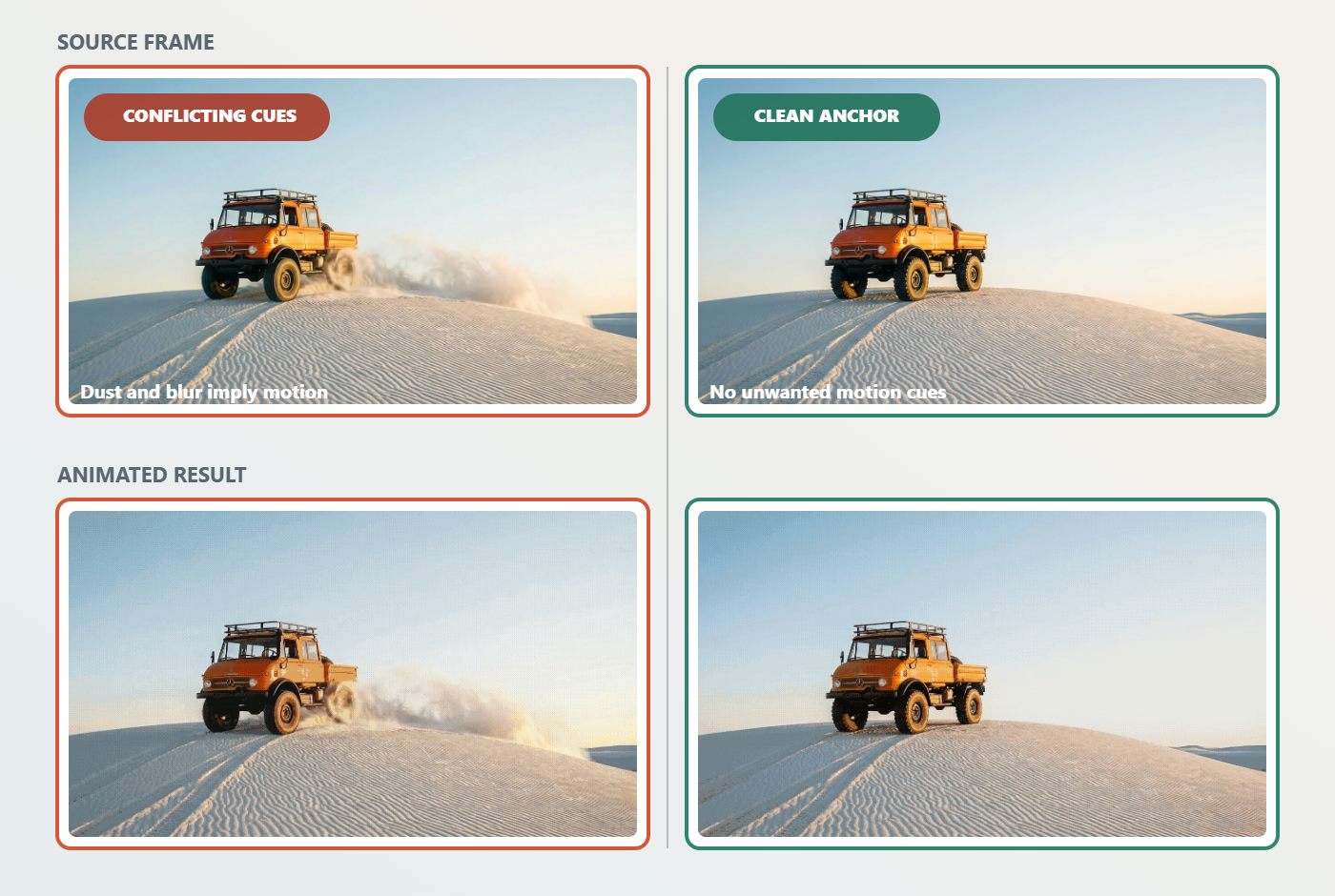
With the same parked-vehicle instruction, removing dust and motion blur from the source frame gives the model a cleaner stationary anchor.
Choose a scene recipe that fits the risk
The SpicyChat AI scene-recipe guide offers six non-explicit setups with opening-frame requirements, an observable action and a revision to try. A single-subject portrait is a compact diagnostic exercise because fewer elements change at once, not a proven winner across all generators.
That distinction matters when comparing tools. A generator that handles a quiet portrait well has not necessarily demonstrated reliable transformations, multi-person interaction, or long dialogue synchronization. Match the evaluation scene to the capability you actually need.
For a first attempt, use:
- One adult subject
- One stable outfit
- One location
- One emotional beat
- One camera instruction
- Minimal hand interaction
A reveal or environment-led shot adds another continuity requirement. To change wardrobe between scenes, plan separate fully clothed shots and inspect the cut rather than relying on an in-shot transformation. A longer narrative should become multiple shots rather than one overloaded prompt.
For continuity across clips, finish the first action in a stable pose. Where the selected tool supports it, reuse the final frame as the next shot’s input. Runway documents this end-frame method for extending sequences; it gives the following clip a concrete visual anchor instead of asking the model to reconstruct continuity from text alone.
Revise one failure at a time
When an output fails, identify the first meaningful defect instead of rewriting everything.
Identity drift: Strengthen the reference image and repeat only the fixed identity anchors. Remove transformations until the basic likeness holds.
Unwanted subject motion: Look for movement cues in the source frame. Replace an unstable image before adding increasingly forceful negative wording.
Camera competes with the performance: Keep the subject action and simplify the camera to static framing or one slow move.
Action feels rushed: Shorten the dialogue, remove a beat, or use a longer supported duration. Do not ask a brief clip to contain an entrance, conversation, turn, wardrobe change, and exit.
Lighting changes between shots: Preserve a specific direction and quality, such as “warm soft light from camera left,” in both the reference frame and prompt.
Unexpected cut: Remove language that implies a new angle or location. Ask for a continuous shot, then split genuinely different compositions into separate clips.
This method also makes tool comparison more informative. If you change the image, action, camera, duration, and style simultaneously, you cannot tell which revision helped. Hold the character block and source frame constant, revise one variable, and record the result in plain terms: identity, motion, camera, timing, lighting, or dialogue.
The final decision checklist
Before submitting to your chosen generator, confirm that:
- Every depicted character is clearly an adult.
- The character lock contains no conflicting appearance or wardrobe details.
- The source image is clean and compatible with the requested direction of movement.
- The scene has one primary visible action.
- The camera instruction supports rather than competes with that action.
- The dialogue and action can fit the selected clip length.
- The external tool currently supports the required reference-image, aspect-ratio, audio, and editing controls.
- You know which single failure category you will address first if the result needs revision.
The practical value of the SpicyChat AI workflow is the handoff: conversation becomes a stable character block, the character block becomes a clean reference frame, and one conversational beat becomes a short motion prompt. Keeping those stages separate gives you a clearer brief, a fairer way to compare generators, and revisions that teach you something instead of merely consuming another attempt.
Handoff questions and corrections
Should every spoken line become a shot?
No. Keep a shared shot when both reactions matter and the positions remain clear. Create a separate shot for a new visual purpose, such as showing the listener's response. Label who is visible, who speaks and where the shot ends, so the editor can tell whether the cut preserves the exchange.
What if the generator ignores the second half of the brief?
Check that the events fit the supported duration. Remove one secondary gesture, then retry only if the remaining action still needs a test. If two locations or compositions are essential, split the brief into two jobs rather than making the paragraph longer. An overloaded brief and an unsupported control require different fixes.
What should travel with the storyboard?
Keep the reference version, fixed character notes, shot identifier, action, camera state, audio route and acceptance criterion together. Mark whether a line is intended for generated speech, a later recording or a subtitle. Do not assume a provider has lip-sync or speech because it accepts text. Retain only the production details the next tool needs.
For the café example, an acceptance note could read: “The visitor's glance reaches the empty seat before the host replies; both adults remain in their assigned positions; the last expression settles.” This is a target to inspect, not a claimed result from a test. Correct the first failed handoff before adding stylistic detail.